
Appearance
Program options
 {.align-center query="?nolink"}
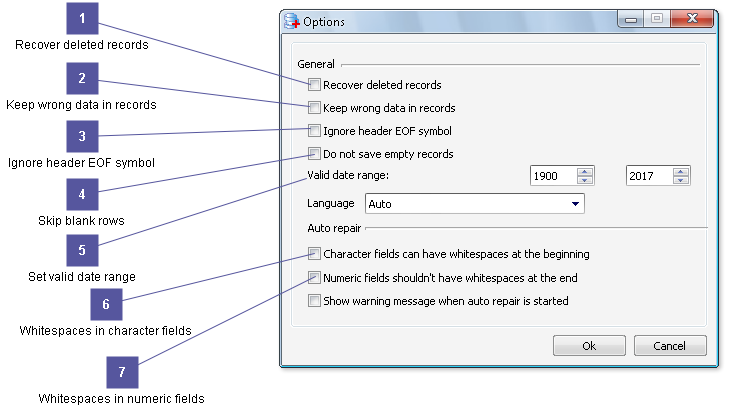
You can customize DBF Doctor to work the best way for your workflow.
 {.align-left query="?nolink"}Recover deleted records

Recovers all records, including deleted ones.
 {.align-left query="?nolink"}Keep wrong data in records

Retains all data, when you restore a DBF file and save it. All data is saved whether the data is correct or not.
 {.align-left query="?nolink"}Ignore header EOF symbol

Searches for fields in the entire file regardless of the header ending symbol.
 {.align-left query="?nolink"}Skip blank rows

Skip blank rows while saving dbf file.
 {.align-left query="?nolink"}Set valid date range

Set valid date range for dbf data analysis. If date field has wrong value it would be highlighted with red color. If date field has value out of the range it would be highlighted with green color.
 {.align-left query="?nolink"}Whitespaces in character fields

Turn on this checkbox if your data in Character fields can begin from whitespace.
 {.align-left query="?nolink"}Whitespaces in numeric fields

Turn on this checkbox if numbers in Numeric fields shouldn't have whitespaces at the end.